Back to Blog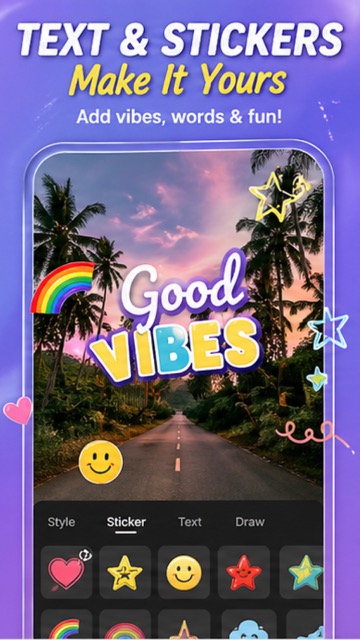
 Download App
Photography
April 28, 2026
5 min read
How to Add Stickers, Text & Drawings to Live Photos on Android
What's better than a live photo? A live photo with fun stickers, custom text, and creative drawings! Personalizing your motion photos makes them more shareable, more memorable, and way more fun.
🎨 The Sticker Library
Live Photo Camera comes packed with a massive sticker library that includes:
- ❤️ Emoji stickers — hearts, stars, smiley faces, and more
- 🌈 Rainbow and neon art — glowing, colorful effects
- ⭐ Sparkle and star effects — add magic to any moment
- 🎀 Cute and aesthetic — kawaii-style decorations
- 🔥 Trending stickers — seasonal and viral designs
✏️ Adding Custom Text
Add your own words with full customization:
- Multiple font styles — modern, handwritten, bold, serif
- Full color picker — match text to your photo's mood
- Text alignment and sizing controls
- Shadow and outline options for readability
🖌️ Drawing and Doodling
Use the Draw tool to add freehand illustrations directly on your live photos. Circle a detail, draw arrows, or create artistic abstract designs — perfect for storytelling and social media content.
💡 Creative Ideas and Inspiration
- Add "Good Vibes" text with a rainbow sticker over a travel live photo
- Put heart emoji stickers around a pet's face in motion
- Write a date or location caption on vacation live photos
- Draw neon arrows pointing to a funny detail in the motion
- Layer sparkle stickers over a sunset live photo for dreamy content
#Stickers #PhotoText #LivePhotoEditor #CreativePhotography #AndroidApp #LivePhotoCamera #2026
Try It Yourself
Download our app and experience these features firsthand.